Always know what's running where.
Versioner's environment state grid gives you a live, cross-tool view of every product and every environment in your stack. It's populated automatically from your CI/CD pipelines.
Sound familiar?
“What version of the API is in staging right now?”
“Did that deploy actually reach production?”
“What went out last Tuesday — and who triggered it?”
“Why is prod behaving differently from staging?”
These shouldn't be hard questions.
The environment state matrix
Every product. Every environment. Right now.
Every product, every environment, the version running in each — in one view, always current. Whether your deployments come from GitHub Actions, Jenkins, Vercel, or a custom script, it all flows into the same grid.
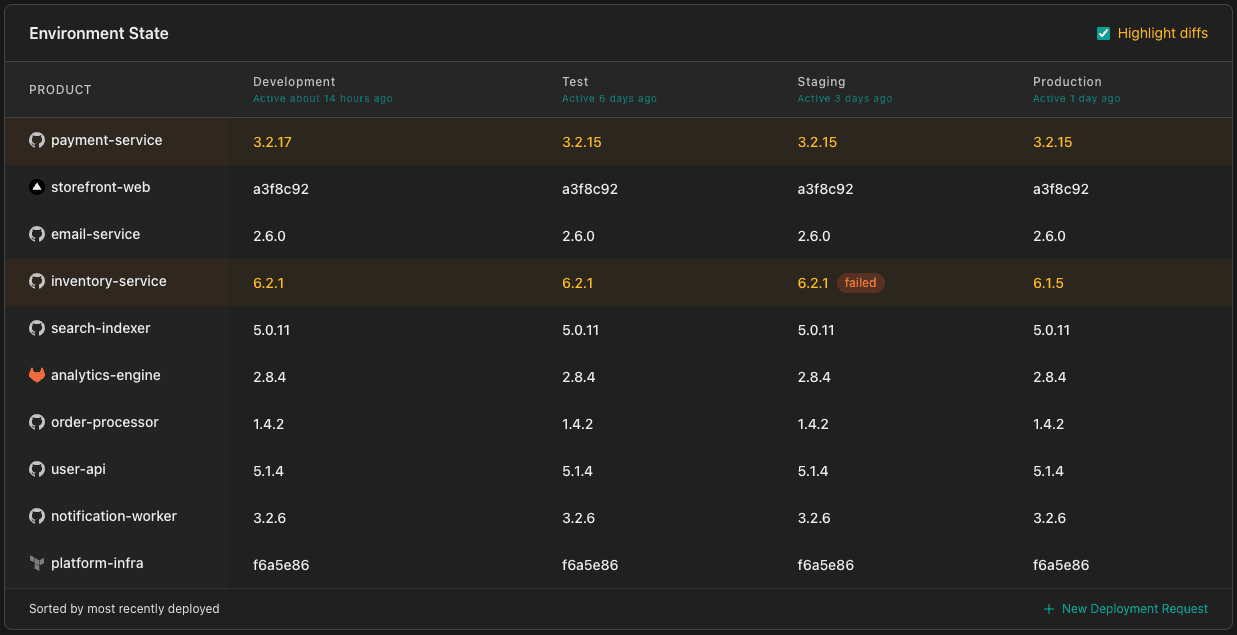
Products with versions that differ across environments are highlighted automatically. Version drift is impossible to miss. Failed deployments surface in the grid the moment they happen. Filter by product or environment to focus on what's relevant to you.
Stop digging around. It's all here.
Click into any product or version and you'll find its full history. Every deployment event, every environment it touched, every version it carried, everyone who triggered it.
Deployment history is searchable and filterable regardless of source. No logs or Slack thread archaeology required. The next time someone asks “what changed in prod last Tuesday?” you'll have an answer in under 10 seconds.
Whether you're running a post-mortem, satisfying an audit, or debugging something unexpected in production — the data is there, and the connections are already made. No tab-switching, no piecing the story together from three different tools.
Track anything you deploy. Not just code.
Your systems are never going to be 100% uniform, and that's ok. Versioner doesn't ask you to consolidate your tooling or standardize your pipelines. It meets you where you are, including the parts that don't fit a standard CI/CD workflow.
If you can make an API call or run a CLI command, Versioner can track it — so the stuff that usually goes untracked until something breaks, doesn't. Swap CI/CD systems, migrate platforms, run an experiment. Your deployment history stays put regardless.
What teams track beyond code
Ask your AI agent what's running.
Connect Versioner's MCP server to Claude Code, Cursor, or any MCP-compatible AI tool. Ask what's running in any environment without leaving your editor. The answer comes from live deployment state, not docs, not Slack, not memory.
Works with Claude Code, Cursor, and any tool that supports the Model Context Protocol.
You
What version of the API is running in staging?
Versioner
v2.14.1, deployed 3 hours ago by @james from pipeline #4821. Production is on v2.13.0. Staging is ahead by one version.
From knowing to doing in one click.
Once you can see what's running, you're one click away from triggering what should run next. Versioner constructs a direct link to your deployment system, no credentials stored, no API keys required.
Many deployment systems support URL-based parameter pre-population and Versioner takes full advantage of it. GitLab CI and Jenkins are strong examples: version and environment arrive pre-filled at the trigger page. For systems like GitHub Actions, the button gets you to the trigger page directly, ready to go.
Seeing the problem is step one.
Versioner tells you what's running where. But knowing what happened is different from controlling how it should happen — who approved it, whether the right people signed off, and whether the process was followed.
That's the Coordination tier. A Deployment Request is to shipping what a PR is to code: a record, a gate, and an accountable process, without slowing your team down.
Explore CoordinationDeployment Requests
A PR-shaped process for shipping: group products, assign approvals, track from kickoff to done.
Required approvals
Role-based approval slots that block the deployment until all sign-offs are in.
Multi-product releases
Bundle three products into one DR. One set of approvals covers the coordinated whole.
Version sign-offs
Capture QA and Security approvals per version, with a record that travels with it everywhere.
Free tier. No time limit.
Everything above is included on the Observe plan. Start with a 30-day full trial, then stay free. No credit card required.
Start 30-day trial- Up to 15 products
- Up to 5 environments
- 90-day deployment history
- Environment state grid
- Full deployment detail
- MCP read access
- GitHub Action, CLI, API & more